
Meeting transcripts with speaker labels, on your own PC.
Diarist records a meeting, or imports a recording, separates up to eight speakers, and stores the transcript in a searchable database on your computer. No cloud, no account, no Python.
Linux is planned. macOS is not: nobody on the project owns a Mac.
If you use a coding agent (Claude Code, Codex or similar), the agent setup guide lets it check your PC, pick the models and set everything up.
- Speaker 1 Let's start with last week's numbers.
- Speaker 2 An hour of audio came back in under three minutes.
- me And nothing left the machine.
- Speaker 3 Then we ship the beta.
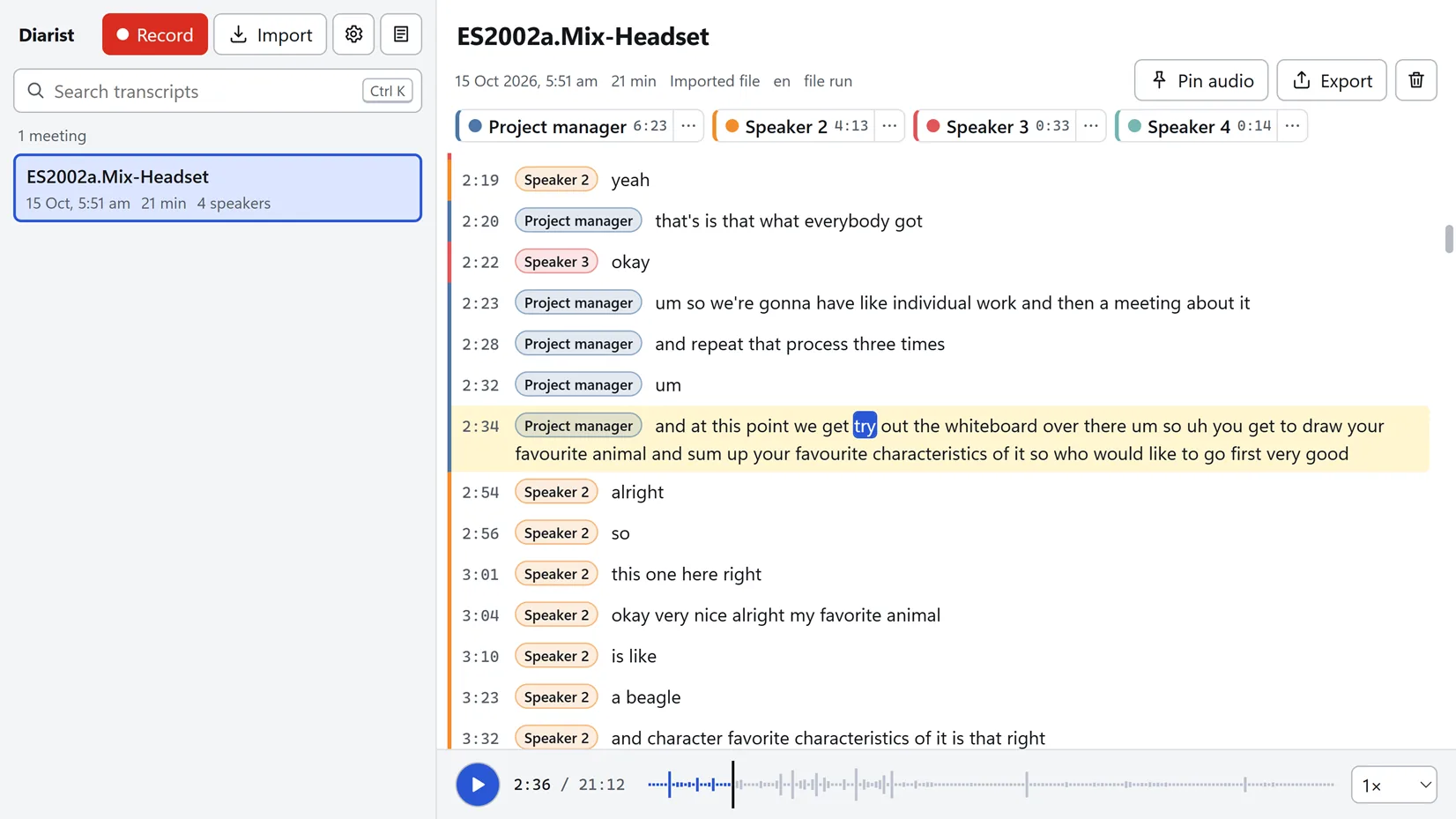
How it works
Live
Press Record. Your microphone is "me"; the sound your computer plays (Teams, Zoom, Meet, a browser) is split into the other speakers. Text appears in about a second. When you stop, the recording is processed once more with the full context and punctuated, and the names you gave people during the meeting carry over. Without headphones, the microphone's copy of the meeting is detected and removed from "me"; headphones still give the cleanest result.
- Ctrl+Alt+R starts a recording from any app.
- GPU memory: budget 2 GB, measured on an RTX 3080.
- Audio is kept as lossless FLAC, about 90 MB per hour, for 30 days by default. Transcripts are kept until you delete them.
From a file
Drop in m4a, mp3, wav, flac, ogg, mp4, mkv and more. On an RTX 3080 an hour of audio takes about two minutes, about 30 times faster than real time over the whole import.
- English by default; 40+ languages with Nemotron 3.5, 30 of them offered in the app's language lists.
- Peak GPU memory 2.6 GB with the English model, 1.82 GB with Nemotron 3.5, measured on a 77-minute file.
- File jobs wait until a recording stops, so the two never run at the same time.
- Punctuation and capitals are added on the CPU, about 5 to 6 seconds per hour of audio, without changing a word.
Rename Speaker 2 to Alice once and the name sticks. Merge labels, recolour, move a line to the right person. Search every transcript at once. Export Markdown, text, JSON, SRT or VTT.
Speaker separation
Speaker separation runs on NVIDIA's Nemotron 3 Diarization. On VoiceArena Diarization-Bench v1, the one independent benchmark that scores every diarizer the same way, it has the lowest error rate of the systems listed: DER 14.7, against 19 to 31 for the others. Up to eight speakers per recording.
Measured on the author's own Zoom meetings on an RTX 3080: 0.2 to 0.3 percent of words went to the wrong speaker; within a second of a speaker change, 5.5 to 7.8 percent with Nemotron 3.5 and 5.6 to 12.7 with the EN model.
Where it struggles
- People talking over each other.
- Far-field microphones and noisy rooms.
- A ninth speaker, who is merged into an existing label.
- Live labels, which are provisional until the pass after Stop.
Models are files you own
Diarist is a harness for speech models, not an application built around one model. The runtime and the models are files in folders on your disk. The app's job is to run them together, tell you what it is doing, and stay out of the way.
Plain folders.
The runtime and every model are ordinary files under models\ and engine\ in your data folder. Drop a file in, press Refresh, use it.
Your PC, your choice.
CUDA, Vulkan or CPU runtime; models by how much GPU memory you have. The setup screen proposes, you decide, and you can change it later.
No gates.
Setup can be skipped. Models the app has never heard of can be added by URL or by file. A runtime version can be pinned, and rolled back by moving a folder.
Nothing silent.
Every download shows its address, hash, size and destination, with Retry and Copy link. When the app cannot do something, it says what is missing and offers the fix.
Measured swaps.
A new model can be compared on your own recordings with the evaluation tools in the repository before you rely on it.
If you have used ComfyUI, this will feel familiar. If you have not, you do not need to.
Privacy
Audio, transcripts, names, settings and logs stay in one folder on your computer.
The app connects to the internet only when you press a button that says so: installing the runtime (from GitHub), downloading a model (from Hugging Face; the punctuation model's runtime and licence files from the project's releases on GitHub), checking for a newer runtime, or checking for updates. The app makes every download itself, over https only. It never checks anything on its own. There is no account, no analytics and no crash reporting. A crash leaves a report in the data folder's logs; it is never sent.
This website is the same: no cookies, no analytics, no third-party requests.
Requirements
Runtime package by GPU
| Your GPU | Package | Status |
|---|---|---|
| NVIDIA with a CUDA 13 driver (R580 or newer; 610.88 measured) | CUDA | Measured on an RTX 3080 |
| AMD, Intel or older NVIDIA driver | Vulkan | Measured on an NVIDIA card only; AMD and Intel untested |
| No usable GPU | CPU | Measured on a Ryzen 9 5900X: about 5 times real time |
GPU memory
| Card | What works |
|---|---|
| 4 GB | File mode with Nemotron 3.5 and low-VRAM mode; live is borderline |
| 6 GB | Live and file mode comfortably |
| 8 GB and up | Everything |
Other requirements: Windows 10 (1803 or newer) or Windows 11, 64-bit; about 1.3 GB of disk for the runtime and default models; recordings about 90 MB per hour; 8 GB of RAM is comfortable.
Models
- Nemotron 3 Diarization (speakers, 107 MB)
- Nemotron Speech Streaming EN 0.6B (English, default, 700 MB)
- Nemotron 3.5 ASR Streaming (40+ languages, optional, 742 MB)
- Horizon-Labs punctuation-restoration-small with ONNX Runtime 1.31.0 (punctuation and capitals, on the CPU, default, 320 MB)
Status
0.1.0-beta.6, released 5 Nov 2026, is the current beta. Installed copies update to it through Check for updates.
What's new in beta.6
- You can see that it is recording. While recording, the taskbar button carries a red dot and the window title reads "● Recording · Diarist"; screen readers announce "Recording". The tray icon's recording dot is redrawn, sharp at every display scale, and the dot in the app stays solid instead of fading to pale pink.
- The punctuation model comes with its authors' licence files. It is pinned to their v1.1.1 release, which adds a
LICENSEand aNOTICE, and Diarist installs those two files instead of the licence text it hosted itself. The model is the same file, so nothing is downloaded again and the punctuation is the same. A model folder from beta.5 shows the two files (13 kB) as missing until Download recommended fetches them. - One line per download. A download made of several files, such as the punctuation model's eight, is one line in Settings and on the first-run screen. It says what is missing beside its Download button, and lists every file's address and SHA-256 under "Files and addresses".
- Sizes in decimal units. The first-run screen and Settings give download sizes in decimal megabytes and gigabytes, as the documentation does: the EN model is 700 MB, and the default download 1.23 GB with the CUDA runtime.
- File transcripts are unchanged. On the evaluation set, 36 recordings and 28 hours, every word is the same as with beta.5, with both speech models. Word error stays at 10.85 percent with the EN model and 11.30 with Nemotron 3.5. Measured on one PC.
What changed in beta.5
- Punctuation and capitals. After Stop and on every import, a small model adds periods, commas and question marks, and Diarist capitalises the start of each sentence; lines end at sentence ends where the pause allows. It runs on the CPU after transcription, about 5 to 6 seconds per hour of audio, with no GPU memory, and downloads on first run with the other models, about 0.3 GB. It never changes a word, its time or its speaker. The speech model's own text is kept, so Remove punctuation on a meeting goes back to it exactly and Add punctuation adds it again; Settings adds it to older meetings in bulk. About two in three of its periods and question marks are where Zoom's own transcripts put one, and it writes about half as many commas as Zoom does. The live view stays unpunctuated.
- Repeated-word loops are collapsed. The EN model sometimes writes one word many times in a burst ("the the the the"). After Stop and on imports each burst is now kept as one word; repeats at speaking pace, such as "no no no no" or a stutter, stay. The meeting details say how many bursts were collapsed. On by default; a setting without a switch in the app keeps every word in transcripts built afterwards.
- Process again. A finished recording whose live transcript was kept (Settings, "Keep the live transcript", off by default) can be processed again from its stored audio with today's models and settings. The audio is only read; the new transcript becomes the one shown, every earlier one stays, and names given while recording carry over.
- Less of the other side in "me" without headphones. When you say almost nothing during a long meeting played on speakers, the echo gate now removes far more of what is left of a loud echo: on one long recording, the words in "me" that look like echo went from 253 to 42, and every other recording and test fixture came out as before. Stored meetings change only with Process again. Still open: your own words spoken entirely over loud speech from the other side can be removed (about one in four on a test fixture); headphones avoid it, and a fix is planned.
- Live text is more accurate. Live recording runs both Nemotron models with 560 ms of lookahead instead of 160 ms. Words show about half a second after they are spoken, against about 0.14 s before, with fewer errors: on the hand-labelled AMI meeting live word error went from 19.75 to 18.03 percent with the EN model and from 23.05 to 21.55 with Nemotron 3.5, and it was lower on all six Zoom meetings measured. GPU memory is unchanged.
- Diarist downloads models itself. Up to beta.4 the runtime fetched them through Windows'
curl.exe, which failed on networks that block certificate revocation checks. Diarist's own downloader, which the engine install already used, works over https only, resumes an interrupted download where it stopped, and checks each file's size and SHA-256. A per-app firewall now seesdiarist.exefor every download. - Data folders with long paths work, also on a network share. Imports and recordings failed once the runtime's path in the data folder reached 260 characters, and so did the database; Diarist now passes long paths in Windows' extended-length form. Checked with a 264-character data folder; a live recording from one is still to be tried by hand.
- Measured on one PC. On the evaluation set, 36 recordings and 28 hours (35 of the author's own and the public AMI meeting), word error with the EN model fell from 11.01 to 10.85 percent, all of it from the collapsed loops, and stayed at 11.30 with Nemotron 3.5. No recording got worse.
- The database is upgraded at the first start, and the old one is kept as
diarist.db.bak-3. Beta.4 cannot open the upgraded database, so going back to beta.4 means restoring that copy.
What changed in beta.2, beta.3 and beta.4
- Imports and the pass after Stop are more accurate. They run the speech model at its full lookahead and the speaker model with its offline geometry. On the hand-labelled AMI meeting the word error rate went from 19.8 to 18.0 percent with the EN model and from 23.0 to 20.7 with Nemotron 3.5, every Zoom meeting in the evaluation set improved, and the speech pass runs about 2.6 times faster. Live recording keeps its low-latency settings.
- Languages follow the model. The language lists show what the installed speech models cover, 30 languages with Nemotron 3.5. A recording or import in a language the selected model does not cover runs on an installed model that does, or offers the Nemotron 3.5 download first. Imports ask for the language, and Japanese and Chinese are now passed to the model instead of running as automatic detection.
- Crash reports stay on your PC. A crash leaves a report in the data folder's logs; the next launch says so and offers Copy report for a bug report. Nothing is sent anywhere.
- The Vulkan and CPU runtime packages run. Beta.1 always asked for the CUDA device, so they could not transcribe or record. Measured on the development PC only: Vulkan on an RTX 3080 at 25 to 28 times real time, CPU on a Ryzen 9 5900X at about 5 times.
- Playback at a usable level. A quiet meeting is raised so its loud speech peaks near full scale, with a volume slider and an Auto level button that plays the audio as stored. The stored audio does not change.
- A new app icon in a light and a dark variant; the taskbar button follows the taskbar theme.
- Beta.3 fixes two things. Names given to speakers while recording are kept after Stop; before, a name given from the speaker legend fell back to "Speaker N" on real meetings. And clicking a word after scrolling the transcript away from the cursor row works again.
- Beta.4 handles recording with speakers. Without headphones the microphone hears the meeting, so the other side was transcribed a second time as "me". Diarist now detects that the microphone hears the system audio and removes the echoed words from "me", in the live view and in the final transcript; the processing after Stop cancels the echo before it transcribes you, and the other side's own channel is never touched. Measured on one PC and five recordings: after Stop, 0 to 0.7 percent of "me" was left as copies of the other side, and 98.3 percent or more of the author's own words were kept on the 111-minute speaker recording. The live view says when it hears echo; the meeting details say how many words were removed, with Restore; the setting is Settings, Recording, "Recording with speakers (echo)". Headphones still give the cleanest "me".
- Beta.4 names the copyright holder. The licence file names Ebin Babu Thomas instead of "Diarist contributors". The Diarist name, logo and icons are no longer offered under CC BY 4.0: they may be used unmodified to refer to Diarist or to package the official builds, not on forks or other products. The code stays MIT.
The full changelog and the release notes
Measured on the development machine (Windows 11, RTX 3080 10 GB)
- File import
- Live recording
- The post-pass
- Search
- Export
- The installer
- The updater, three times (beta.1 to beta.2, beta.4 to beta.5, beta.5 to beta.6)
Untested so far
- The Vulkan and CPU runtime packages beyond the development PC (an RTX 3080 and a Ryzen 9 5900X)
- Every machine that is not the author's
Next: better handling of speaker changes, echo cancellation in the live view, and recognising the same person across meetings.
Roadmap, changelog and known issues
Open source
MIT licence. The runtime (Apache-2.0), ONNX Runtime (Microsoft, MIT) and the models (OpenMDW-1.1, NVIDIA Open Model License; the punctuation model Apache-2.0 as declared in its model card, fine-tuned from mmBERT-small, MIT) are downloaded at first run under their own licences. There is no paid tier, no licence key and no account. Free forever. Speaker separation is part of the app. The Diarist name, logo and icons are not MIT: they may be used to refer to Diarist or to package the official builds, not on forks or other products. Issues and pull requests on GitHub.